How Can Access Control Systems Be Used in Offices?

Time:2026-10-20 Author:Sienna
0%

When businesses ask, “can access control systems be used for offices,” the practical answer is yes. These systems can manage entry to reception areas, meeting rooms, server closets, and employee-only workspaces. A modern office may use keycards, mobile credentials, PINs, or biometric readers. Each option creates different costs, privacy concerns, and maintenance needs.

A well-designed system begins with clear access levels. Employees might enter during working hours, while contractors receive temporary credentials. Visitors can sign in at reception and wear visible badges. Audit logs can show who entered a restricted room and when. This detail matters after a misplaced laptop, an unexpected delivery, or a late-night alarm. Security consultant Bruce Schneier stated, “Security is a process, not a product.” His observation fits office access control closely. Hardware alone cannot protect a workplace. Staff training, regular reviews, and prompt credential removal are equally important.

The best setup also supports daily work. Employees should not queue for ten minutes at a locked door. Emergency exits must remain usable and clearly marked. Access permissions should change when people transfer teams or leave the company. No system is flawless. Tailgating, forgotten badges, software errors, and poor visitor procedures can still create weaknesses. That assumption needs testing. Office managers should review access reports, inspect readers, and ask employees what feels inconvenient. A thoughtful article on this topic can explain how access control improves safety without turning the office into an uncomfortable checkpoint. It should examine technology, human behavior, reliability, and responsible data handling together.
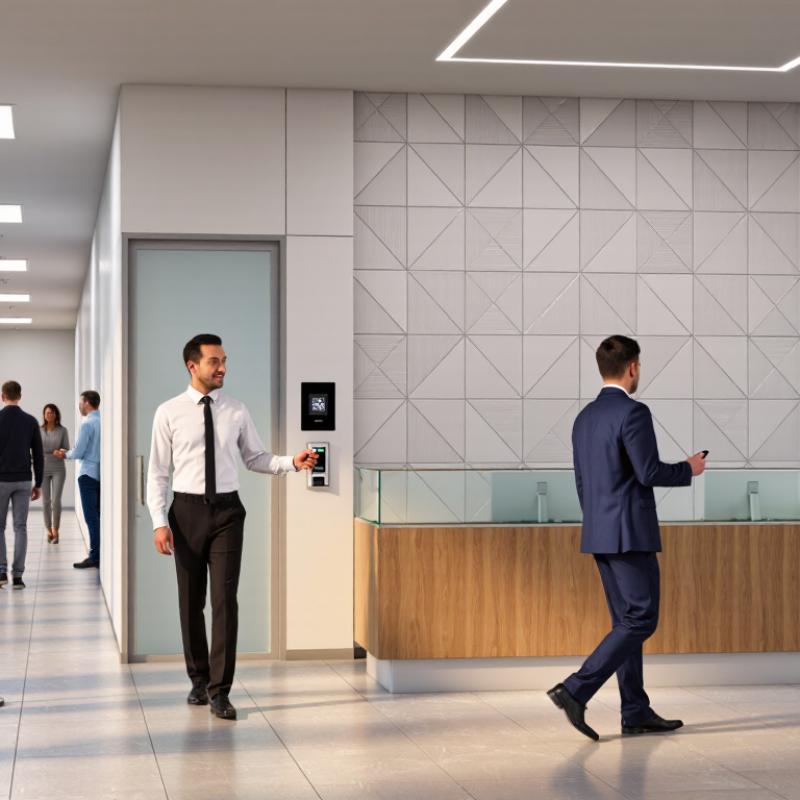
How Can Access Control Systems Be Used in Offices?

What Are Office Access Control Systems?

What Are Office Access Control Systems?

Office access control systems manage who can enter specific workplace areas and when. They replace traditional keys with controlled credentials, such as cards, mobile passes, PINs, or biometrics. A complete setup usually includes readers, electronic locks, controllers, management software, and activity logs.

At reception, a visitor may receive a temporary pass that expires at 5 p.m. An employee’s access can change when their role changes. The system can also restrict server rooms, storage areas, or executive offices. In 2024, the Verizon Data Breach Investigations Report found that the human element appeared in 68% of breaches. Access records cannot prevent every mistake, but they can reveal unusual entry patterns and support faster investigations. Useful systems connect with visitor management, alarms, and emergency procedures. They must also protect stored credentials and limit administrative permissions.

In practice, usability matters.

A secure door that employees constantly prop open is not a successful control. The 2024 IBM Cost of a Data Breach Report placed the global average breach cost at 4.88 million dollars. That figure does not mean every office needs expensive hardware. It does show why access decisions require careful design. Managers should review permissions regularly, test backup entry methods, and remove inactive credentials promptly. Some offices still collect more access data than they can responsibly review. That is a weakness worth questioning.

How Do Office Access Control Systems Work?

Office access control starts with identity verification at a doorway. A reader scans a card, keypad code, mobile credential, or biometric feature. The device sends encrypted data to a control panel. The panel checks permissions against an access database. If the details match, it signals the lock to release. That decision usually takes less than a second. Not magic.

A professional installation connects doors, schedules, alarms, and visitor records. An employee may enter the lobby from 8 a.m. to 6 p.m., but not the server room. Managers can assign permissions by role, location, and time. Each credential event records the door, time, and result. Security staff can review these logs during an incident or routine audit. Access records still need careful protection and limited administrative access. Biometric options also require clear privacy procedures and accurate enrollment.

Good systems support exit buttons, emergency release procedures, and backup power. If the network fails, local controllers may preserve approved permissions temporarily. That feature needs testing. A locked door can protect equipment, yet it may delay evacuation if configured poorly. In practice, human habits often weaken strong hardware. Employees may share cards, hold doors open, or forget to report lost credentials. Training and regular reviews reduce these gaps. No system is perfect.

Which Access Methods Are Used in Offices?

Office access methods should match the building’s risks, staff routines, and visitor flow. Each choice affects security, cost, and daily convenience.

Keycards remain common because they are quick to issue and easy to cancel after loss. Employees tap a card beside the main entrance, then walk through without stopping. However, cards can be borrowed or forgotten. PIN pads offer another option, especially for small offices. Codes are easy to share. That is risky. Biometric readers use fingerprints or facial features, reducing the need for physical credentials. They require careful privacy controls, accurate enrollment, and backup access when recognition fails.

Mobile credentials can turn an approved phone into a digital key. They support remote permission changes and create useful entry records. Still, dead batteries, damaged phones, or poor connectivity can interrupt access. Physical keys may seem outdated, yet they can support emergency rooms, storage areas, or maintenance tasks. Their weakness is simple: lost keys are difficult to track.

A reliable office usually combines methods instead of trusting one system. Staff might use cards at exterior doors, PINs for internal zones, and a staffed visitor desk during business hours. Access levels should follow job duties and change when roles change. Logs need regular review, not just storage. I have seen teams focus on advanced readers while ignoring doors that fail to close fully. That detail matters. Clear procedures, tested backups, and trained employees often protect an office better than expensive equipment alone.

How Can Access Control Systems Be Used in Offices?

Offices commonly combine several access methods to control entry, record access events, and manage visitors. The chart compares practical suitability using a five-point index based on centralized administration, audit trails, convenience, and deployment flexibility.

RFID cards and mobile credentials are widely suitable for daily employee access because they support permissions and event logging. PIN pads are useful for smaller offices, while biometric readers can strengthen identity verification. Visitor QR codes are mainly used for temporary access, and mechanical keys provide limited centralized control.

Where Are Access Control Systems Applied?

Access control systems are applied wherever an office must distinguish between authorized and unauthorized movement. They protect main entrances, reception areas, employee-only corridors, elevators, and emergency exits. A card reader at the front door may control daily access, while a visitor pass can limit guests to meeting rooms. Small offices often need only one controlled entrance. Larger workplaces may require separate permissions for finance departments, laboratories, storage rooms, and executive areas.

Server rooms deserve stricter controls. Access may combine an employee credential with a PIN, security desk approval, or entry log review. IBM’s 2024 Cost of a Data Breach Report reported an average global breach cost of 4.88 million dollars. That figure does not prove physical access caused a breach. It does show why protecting rooms containing critical equipment matters. Access records can also support investigations, but only when staff review them consistently.

These systems are useful in warehouses, shared offices, research facilities, and temporary project sites. They can connect with time schedules, cameras, alarms, and employee departure records. Verizon’s 2024 Data Breach Investigations Report found that human involvement appeared in 68% of breaches. Access control cannot remove human error. Tailgating still happens. Lost credentials still happen. Offices need clear visitor procedures, prompt credential removal, and regular permission reviews. In practice, convenience often weakens security. That trade-off deserves honest review.

How Can Offices Manage Security and Privacy Risks?

Access control systems help offices manage privacy risks when they control more than doors. They should connect employee badges, visitor passes, restricted rooms, and access logs. The 2024 Data Breach Investigations Report found that human involvement appeared in 68% of breaches. A misplaced badge or shared door can therefore become a serious privacy weakness.

Effective offices use role-based permissions. Finance staff may enter records rooms, while visitors remain in reception areas. Temporary access should expire automatically, not depend on memory. Security teams should review unusual entries, such as repeated attempts after working hours. The 2024 global breach-cost report recorded an average breach cost of 4.88 million dollars. It also reported an average 258-day breach lifecycle, showing why early detection matters.

Physical details matter. A reception desk should confirm visitor identity, print a visible pass, and record the host. Staff should challenge tailgating politely, without creating confrontation. Cameras can support investigations, but excessive monitoring may damage employee trust. Privacy notices, limited retention, and restricted log access are essential.

No system is perfect. A rushed exception can undo careful planning. Offices should test lost-badge procedures, audit permissions quarterly, and remove access immediately after role changes. Some organizations still collect more data than they need. That deserves honest review.

How Can Access Control Systems Be Used in Offices? - How Can Offices Manage Security and Privacy Risks?

Office access control practices, security risks, privacy safeguards, and measurable controls
Office Area or Process Access Control Method Primary Security Benefit Main Privacy or Security Risk Recommended Safeguards Useful Monitoring Measure Typical Risk Level
Main entrance Electronic credentials, reception screening, and door access logs Limits entry to authorized personnel and creates an auditable record of access events. Lost credentials, tailgating, or unauthorized visitors entering behind employees Use anti-tailgating procedures, promptly disable lost credentials, train reception staff, and review unusual access events. Percentage of access events successfully recorded; number of unauthorized entry attempts High
Restricted work areas Role-based access assigned according to job responsibilities Prevents employees from entering areas unrelated to their duties. Excessive permissions remaining active after a role change Apply least privilege, require manager approval, and perform periodic access reviews. Percentage of accounts reviewed on schedule; number of unnecessary permissions removed High
Server and network rooms Separate physical access authorization, visitor escorting, and entry logging Protects critical infrastructure from tampering, theft, and accidental disruption. Unauthorized physical access could expose systems or interrupt operations. Restrict access to approved technical staff, retain logs, use environmental monitoring, and escort visitors at all times. Number of unapproved entries; percentage of visitors continuously escorted High
Employee offices and shared workspaces Building credentials combined with lockable rooms, cabinets, and clean-desk procedures Reduces unauthorized access to documents, devices, and conversations. Confidential information may be viewed, photographed, or removed by unauthorized people. Lock sensitive materials, enable automatic screen locking, use privacy screens where appropriate, and remove unattended documents. Clean-desk inspection results; number of reported unattended confidential documents Medium
Meeting rooms Room booking permissions, occupancy controls, and confidential meeting procedures Helps ensure that sensitive meetings occur in appropriate spaces. Unauthorized participants, overheard discussions, or accidental recording Verify participants, restrict recording, display confidentiality notices, and check rooms after sensitive meetings. Number of meeting-room access exceptions; reported unauthorized recordings Medium
Visitors and contractors Pre-registration, identity verification, temporary badges, and host escorting Distinguishes visitors from employees and limits visitor movement. Visitor information may be collected unnecessarily or retained too long. Collect only necessary information, explain its purpose, set badge expiration times, and delete visitor records according to a documented retention schedule. Percentage of temporary badges returned or automatically expired; visitor records retained past policy High
Biometric entry systems Fingerprint, facial, or other biometric verification used for controlled access Can make impersonation more difficult and reduce reliance on physical cards. Biometric information is sensitive and cannot be replaced easily if compromised. Use a lawful basis, provide a non-biometric alternative where required, encrypt templates, restrict access, and define deletion procedures. Percentage of users with an alternative access method; number of biometric privacy incidents High
Security cameras Video surveillance at entrances, exits, and other justified locations Supports incident investigation and may deter unauthorized activity. Excessive monitoring can affect employee privacy and create sensitive personal data. Use visible notices, limit camera coverage, prohibit cameras in private areas, restrict viewing rights, and set a defined retention period. Percentage of cameras covered by a documented purpose; footage access requests and approvals High
Employee onboarding Identity verification, access approval, and documented security training Ensures that new personnel receive only appropriate physical and system access. Access may be issued before employment details and responsibilities are confirmed. Use an approval workflow, verify employment status, provide security and privacy training, and record issued credentials. Average time from onboarding approval to access provisioning; training completion rate Medium
Role changes and transfers Access recertification when job duties or reporting lines change Keeps permissions aligned with current responsibilities. Former privileges may remain active and create privilege accumulation. Trigger an immediate review after a role change, remove obsolete permissions, and require confirmation from the new manager. Percentage of role changes reviewed within the defined service period High
Employee offboarding Coordinated deactivation of physical credentials, system accounts, and remote access Prevents former personnel from entering facilities or accessing company information. Delayed deactivation or failure to recover keys, badges, and devices Use a same-day offboarding checklist, recover issued assets, disable remote access, and preserve necessary records securely. Time between termination notification and access deactivation; unreturned credentials High
Emergency access Break-glass credentials or temporary override procedures Allows authorized response during emergencies without permanently broadening access. Emergency credentials may be misused or left active after the event. Require documented approval, limit duration, log every use, review events afterward, and immediately revoke temporary access. Percentage of emergency events reviewed; temporary credentials revoked on time High
Access logs and audit records Centralized recording of successful and failed entry events Supports investigations, compliance reviews, and detection of unusual activity. Logs may reveal employee movements or be altered by unauthorized administrators. Restrict log access, protect records from alteration, synchronize system clocks, and retain data only as long as justified. Log completeness, alert response time, and number of unauthorized log-access attempts Medium
Access control administration Separation of duties, multi-factor authentication, and administrative activity logging Reduces the risk of one administrator creating or approving inappropriate access alone. Compromised administrator accounts could affect many users and doors. Use strong authentication, separate approval and provisioning duties, review administrator actions, and maintain recovery procedures. Percentage of administrators using multi-factor authentication; privileged actions reviewed High
Policy and compliance management Documented access rules, privacy notices, risk assessments, and regular audits Creates consistent governance for security, privacy, and accountability. Controls may become outdated as offices, laws, technologies, or risks change. Review policies at least annually and after significant changes, document lawful purposes, and provide a process for handling access-related complaints. Policy review completion rate; number of overdue corrective actions Medium

FAQS

What is an office access control system?

It manages who may enter specific workplace areas and when. It uses cards, mobile passes, PINs, or biometric credentials. The system usually includes readers, electronic locks, controllers, software, and activity logs.

Which office areas can access control protect?

It can protect entrances, reception areas, employee corridors, elevators, server rooms, storage spaces, and executive offices. A front-door reader may allow general staff access. A server room may require stronger verification.

How are visitors managed?

Visitors can receive temporary passes with limited permissions. A pass might allow meeting-room access until 5 p.m. Visitor procedures should include clear approval, tracking, and timely pass removal.

Can employee access change after a role change?

Yes. Permissions can be adjusted when an employee changes departments or responsibilities. Inactive credentials should be removed promptly. Delayed updates create a quiet security weakness.

Why are server rooms given stricter controls?

Server rooms may contain critical equipment and sensitive information. Access can require a credential, PIN, security approval, or entry-log review. Strong controls help, but they cannot replace careful staff behavior.

Can access records prevent every security problem?

No. They can reveal unusual entry patterns and support faster investigations. Tailgating and lost credentials can still occur. Records help only when someone reviews them consistently.

What makes an access control system practical for employees?

Employees should enter smoothly without bypassing the system. A secure door that staff constantly prop open is not successful control. Convenience wins sometimes. Managers should question that trade-off.

How should offices review access permissions?

Managers should review permissions regularly and remove unused credentials quickly. They should test backup entry methods and emergency procedures. Some offices collect more data than they can responsibly examine, which deserves reconsideration.

Conclusion

Office access control systems are security solutions that regulate who can enter specific areas and when. They may combine electronic locks, entry readers, identification credentials, monitoring tools, and visitor management features. By connecting these elements, offices can organize access permissions according to employees’ roles, working hours, and department requirements. Common access methods include cards, PINs, mobile credentials, biometric verification, and temporary passes for visitors or contractors.

These systems can be applied to main entrances, private offices, meeting rooms, storage areas, server rooms, and other restricted spaces. They also create access records that help organizations review unusual activity and respond more efficiently to security incidents. When considering “can access control systems be used for offices,” the answer is yes, provided they are carefully configured and responsibly managed. Offices should protect personal information, limit data collection, update permissions regularly, secure backup systems, and clearly inform employees about monitoring practices. A balanced approach can improve safety while respecting privacy and maintaining a convenient workplace experience.

Sienna

Sienna

Sienna is a skilled marketing professional with a deep expertise in our company’s core products and services. With a passion for innovation and detail, she plays a pivotal role in crafting insightful blog posts that not only highlight the unique features of our offerings but also provide valuable......