A smart doorbell should make the front entrance easier to monitor, not add another confusing device to your home. Before comparing models, picture the view from your doorway: a visitor standing on the step, a parcel near the mat, and the path beyond. These details reveal whether you need a wider viewing angle, clearer night video, or reliable motion alerts. Small details matter.
So, what features should a smart doorbell have? Useful essentials include dependable video, two-way audio, adjustable motion detection, and a clear alert history. Check whether recordings require a subscription, how long clips remain available, and whether local storage is offered. Also consider your Wi-Fi signal, existing chime, power source, and phone compatibility. A feature list can look impressive, but it may not match your home.
This guide explains how to weigh those choices without treating the highest resolution or longest feature list as an automatic win. A sharp image is less helpful if alerts arrive late or the camera misses someone at the door. Privacy settings deserve attention too, including options for activity zones and account security. Even a careful buyer can overlook installation limits or ongoing costs. That is easy to do. The right choice depends on your entrance, your budget, and how you plan to use the footage.
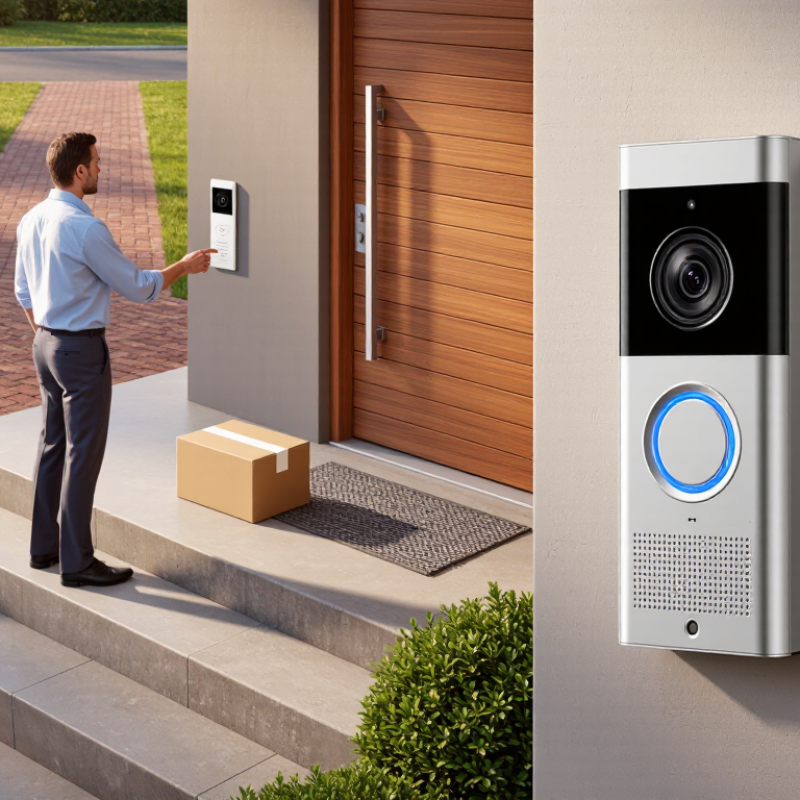
Before buying, inspect the wiring at the existing button and chime. Note whether the chime is mechanical or electronic, then check the doorbell’s required transformer voltage and power rating. A wired model may need a compatible transformer or a bypass adapter; a battery model still needs a suitable mounting surface and reliable Wi-Fi. Small details matter.
The U.S. Census Bureau’s 2023 American Community Survey, Table B25034, indicates that about 45% of U.S. housing units were built before 1980. Age alone does not reveal wiring condition, but older homes may have low-voltage systems that need closer inspection. Check the transformer label, if accessible, and measure Wi-Fi signal strength at the doorway—not beside the router. A signal that drops behind brick or metal can cause delayed alerts.
Also measure the doorframe and check for space around the button, especially near trim or storm doors. Confirm that the included mounting plate fits the siding and that the chime works with the device. Turn off power before handling wired components; call a qualified installer if the transformer is unlabeled or wiring looks damaged. I might overlook the chime, too. It is easy to focus on camera features and miss that compatibility issue.
Battery models avoid wiring, but cold weather and frequent alerts can shorten battery life. Check how charging works and whether removing the unit leaves your entrance uncovered. Wired models need compatible wiring and transformer ratings. An old chime proves little.
Test the signal at the doorway, not beside the router. Walls, metal doors, and distance can weaken coverage. Check supported Wi-Fi bands and upload speed, too. Test at busy times. A quick check can miss slowdowns.
Look for a clear face, not just a moving shape. Check resolution and field of view, including close-up images. A very wide view may distort faces near the edges. Review the camera angle for blind spots by steps or railings.
View sample footage at your own entrance, both with the porch light on and off. Infrared light can reflect from nearby walls or glass. Advertised range is only a starting point. Your narrow porch may behave differently.
Listen from the sidewalk, where wind and traffic can blur speech. Check for clear sound and reduced echo. Try it at dusk. Ideal test conditions can be misleading.
If you often miss deliveries, clear alerts and two-way audio may matter more than facial recognition. Make sure the camera covers packages without pointing into a neighbor’s windows. More features are not always better.
Compare the first-year total, including subscriptions, storage, charging, or installation. Some models offer local storage or basic alerts without a monthly fee. Read the storage terms carefully. Small detail, big difference.
Check whether several people can share access and adjust notifications. Too many alerts become background noise. Renters should check whether installation requires drilling. Revisit motion zones after a week; actual foot traffic may surprise you.
Choosing a smart doorbell starts with checking whether it fits your existing wiring, mounting location, and home setup. Consider how it will receive power, whether your Wi-Fi connection is reliable near the entrance, and whether installation is manageable for you. Then compare the camera’s image quality and field of view, two-way audio clarity, and night vision to make sure you can see and communicate with visitors in different conditions.
Before deciding, review how motion alerts can be adjusted, how video is stored, and what privacy controls are available. Think about who in your household will use the doorbell and which smart features are genuinely useful. Asking “what features should a smart doorbell have” can help you focus on practical needs rather than extras. The right choice balances compatibility, dependable performance, privacy, and ongoing costs within your budget.

 SMTR SmartLiving